

Dear Customers,
Over the past three months, we have focused our efforts on implementing a number of improvements, most of which are based on your requests and feedback.
Each update is a direct response to the real needs of transport companies that work with the system on a daily basis.
Many of these changes have already been introduced and became available during development, but until now we haven’t published separate announcements.
This article gathers all the updates so you can conveniently review what has been implemented recently.
Enhanced AI Capabilities
Now, when adding maintenance or repair reports in the “Fleet” and “Trailers” modules, it’s enough to simply upload a PDF invoice — the system will use AI to recognize the document and automatically fill in all key fields:
- mileage,
- date,
- items with descriptions and prices,
- total cost.
Additionally, you can instantly create an purchase invoice based on the report: SmartCP will automatically transfer all the data and attach the original document to the corresponding invoice in the system.
What used to take 5–7 minutes of manual input now takes just a few seconds and clicks. It’s another step toward full document automation and saving your time.
Automated Debt Collection
We have implemented a multi-phase debt collection process and an automated monitoring system with reminders and notifications.
This will greatly simplify the tracking of unpaid invoices and speed up the debt recovery process.
Invoice phases:
A total of 5 phases are available, each customizable:
- Reminder
- Follow-up Notice
- Demand Notice
- Final Demand Notice
- Demand Notice + Penalty
For each phase, you can configure:
- Period – for example, 3 days before or after the due date
- Email Еemplates – separate emails for each phase with multilingual support
- Document – generated automatically, with customizable headers and content in required languages
- Penalty (phase #5 only) - customize the ranges of amounts and corresponding penalties, e.g.: 0 to 5,000 EUR - penalty 40 EUR
A new “Debt Collection” tab has been added to the invoice configuration to set all phase parameters and templates.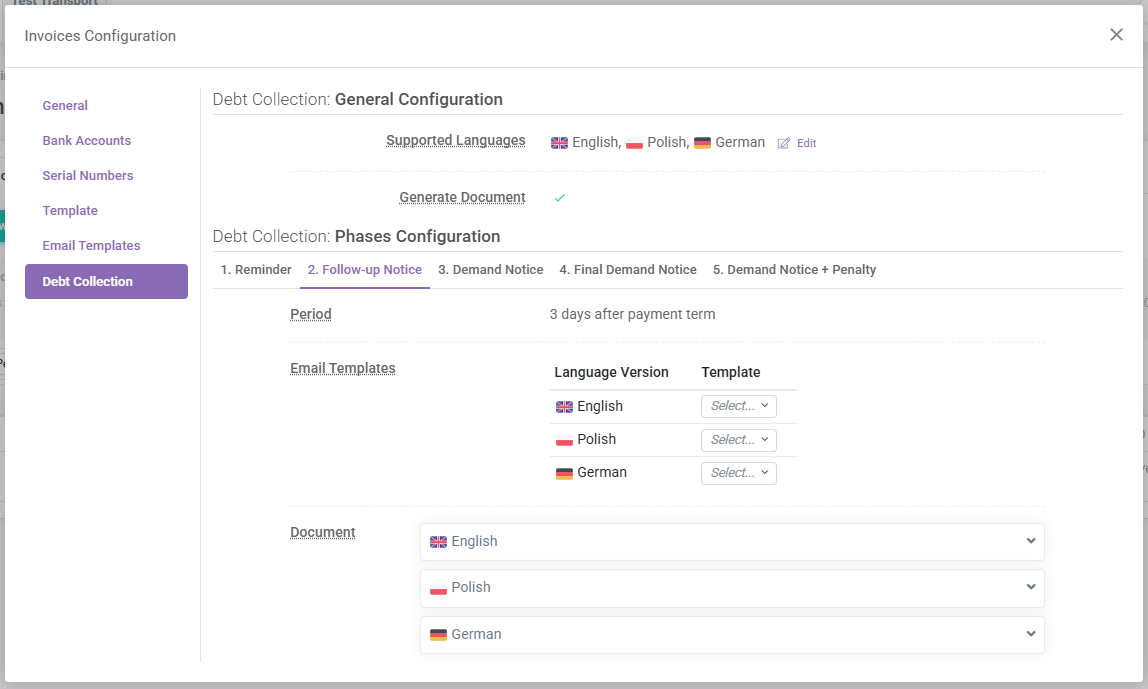
Automatic Monitoring and Notifications
The system tracks the current status of each invoice and determines its phase.
A new “Debt Collection” button is now available above the invoice list:
- If all invoices are in order, the button appears in the standard color
- If any invoices require action, the button is highlighted in a warning color
Clicking it opens a window with invoices grouped by collection phase.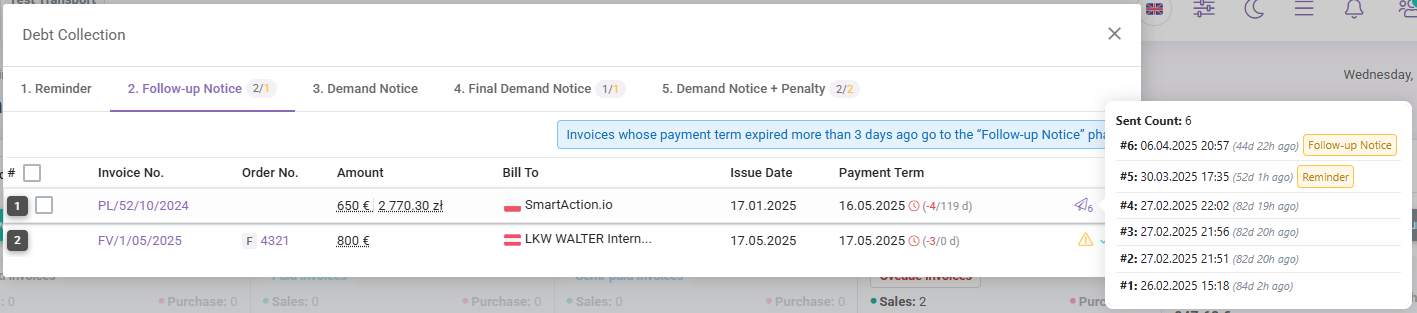
Each phase includes statistics:
- Total number of invoices in the phase
- Number of invoices that require attention (i.e. emails not yet sent)
you can quickly filter such invoices, send emails directly from the interface, or generate an official PDF document. The system will automatically insert the email template, attach the invoice and the relevant document.
Other Updates
Code optimization has been carried out, significantly speeding up page load times. For example, the main page of the [Orders] module now loads in 0.9–1.25 sec compared to the previous 1.6–1.75 sec, and the Dashboard loads in 0.45–0.6 sec instead of 0.9 sec. During this optimization process, we also came up with additional ideas to make the system even faster. We’ll continue working hard to save every fraction of a second – so your experience with SmartCP is as fast and comfortable as possible.
Please note: speed tests were conducted on a high-performance PC with a stable wired internet connection.
[Orders] Module
- Saving of selected sorting options added – previously, the system reverted to default sorting (by date added) after a page reload
- Route planning: improved interface, added info (distance, time, toll costs) between addresses, including ferry routes and ferry cost entry
- Multiple expense entries with descriptions can now be linked to an order – previously only one total amount could be entered
- Option to require a reason before deleting an order – enabled in module settings
- Possibility to create orders without a number; system now notifies and tracks such orders
- New setting: Kilometers from route planning – choose whether to save planned or actual kilometers
- Option to display overall order status next to order number – enabled in module settings
- Option to indicate the date when a task in the order was completed
- Option to choose text color for driver notes
[Fleet] Module
- Search/filter added to maintenance and repair reports
- Salary calculation added when creating a work plan for drivers under Work Planning
- Place field added to maintenance and repair reports
- File upload added for each document under the Documents tab
[Trailers] Module
- Search/filter added to repair reports
- Place field added to repair reports
- File upload added for each document under the Documents tab
[Finance] Module (Invoices)
- Net/gross toggle added for unit pricing in invoices
- Invoice filtering by bank account added
- Invoice filtering by client name – now you can enter a name manually, not just select from the list
- Notes can be added to bank accounts, automatically shown on the invoice when selected
- Turkish language added for invoice PDF download
- New parameter Counting Payment Term From – choose whether to count from invoice date or service date
- Total section added to statistics above the invoice list
[Drivers] Module
- Option to select salary currency added
- SmartDriver app activation can now be linked not only to the driver but also to a vehicle – useful if one phone is assigned to the vehicle and used by multiple drivers
[Profitability] Module
- Final totals added for Vehicle Costs and Other Costs columns in the monthly report under Transport
Integrations with new telematics systems
- Webfleet
- Satis GPS
- Logisat
- Fleetboard
- WidziszWszystko
If you have any questions or require further clarification, please feel free to reach out to us at support@smartcp.org.
Best regards,
SmartCP Team