

Dear Customers,
We are excited to announce a fresh update to our system aimed at simplifying and speeding up operations in the [Orders] module and beyond!
General Orders List on the Main Page of the [Orders] Module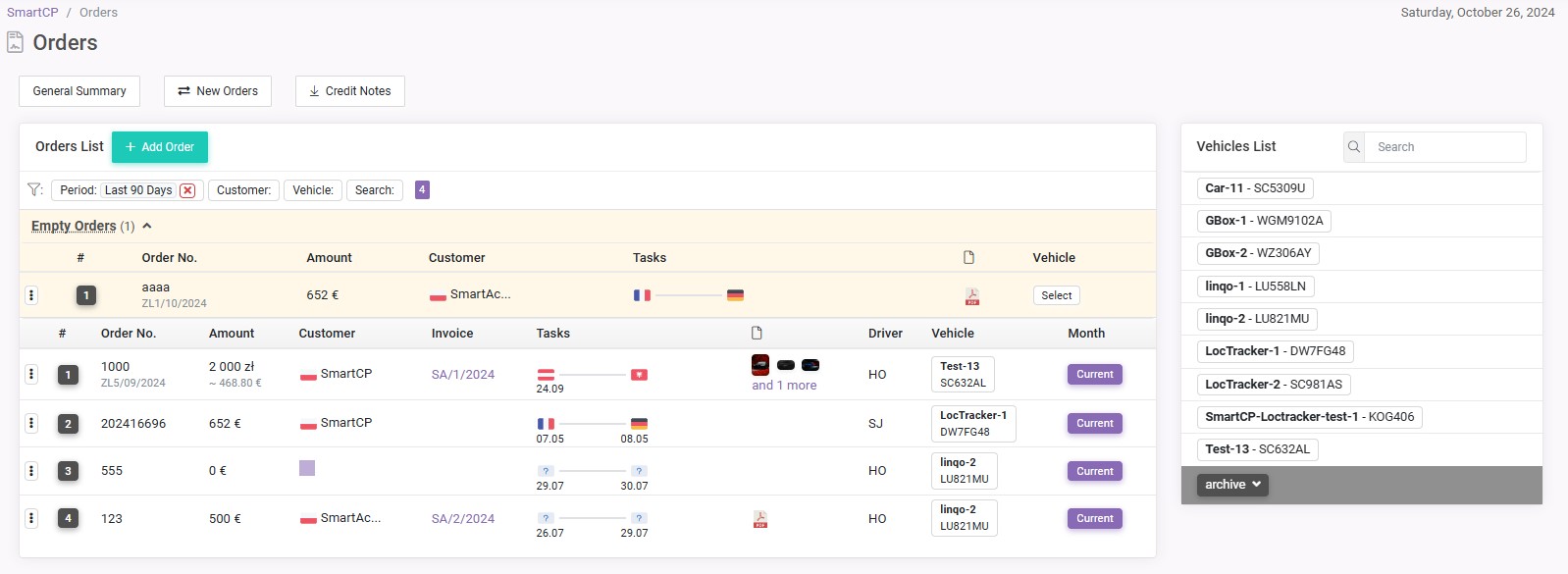
Now, on the main page of the Orders module, you have a general list of all orders from different vehicles. Instead of the usual large buttons to navigate to specific vehicles, you can now see and work with orders from all vehicles simultaneously. We have retained the previous vehicle list — it has been minimized and moved to the right of the orders list for convenient access.
In the updated interface, you can still work with orders by months and view orders for each vehicle in a specific month. However, now you also have the option to add and edit orders directly on the main page without having to navigate through levels. The main order data is presented in a convenient and concise form, which allows you to see the most important things at a glance.
Empty Orders
With this update, we have also introduced a new capability — the creation of "empty orders". These are orders that are not yet assigned to a specific vehicle. Previously, each order had to be immediately assigned to a vehicle, but now you can create an order in advance without specifying which vehicle will fulfill it. This is especially convenient if the order has been accepted, but the allocation to vehicles is not yet complete.
This approach allows companies to pre-register orders and plan their work, and later, if necessary, allocate the orders to vehicles.
Other Updates in the [Orders] Module
- When adding an order, the system now automatically checks the expiration dates of documents, fuel & toll cards, and vehicle maintenance, and warns about their impending expiration
- Added new types to the order tasks: Customs and Weights
- Added option to change the order currency
- The date and time in the order task are now separated: you can specify only the date without the need to choose a time
- Added ability to navigate from the order to the invoice
- Added ability to view attached files to the order when editing the order
- Added ability to transfer orders from one vehicle to another (position in the Options of the order)
- Added ability to plan the route when editing the order (update the route)
New Vehicle Statuses in the [Fleet] Module
In the Fleet module, we have introduced statuses for vehicles to help you manage them according to their roles and current usage.
Active Vehicle — this status is for vehicles that are actively involved in executing orders and calculating profitability. For such vehicles, the full functionality of the system is available, including management, monitoring all aspects of the transport process, and reporting. The cost remains the same — 10 €/vehicle/month.
Passive Vehicle — this status is for vehicles that are not participating in transport orders but require monitoring and maintenance. For these vehicles, limited functionality is provided, which includes monitoring document expiration dates and recording maintenance and repair history. This status is ideal for passenger or private vehicles where documentation support is important but full system functionality is not required. The cost is 2 €/vehicle/month.
These changes will allow you to flexibly adapt the maintenance costs of the fleet, considering the different roles of vehicles in the company.
Trips in the [Fleet] Module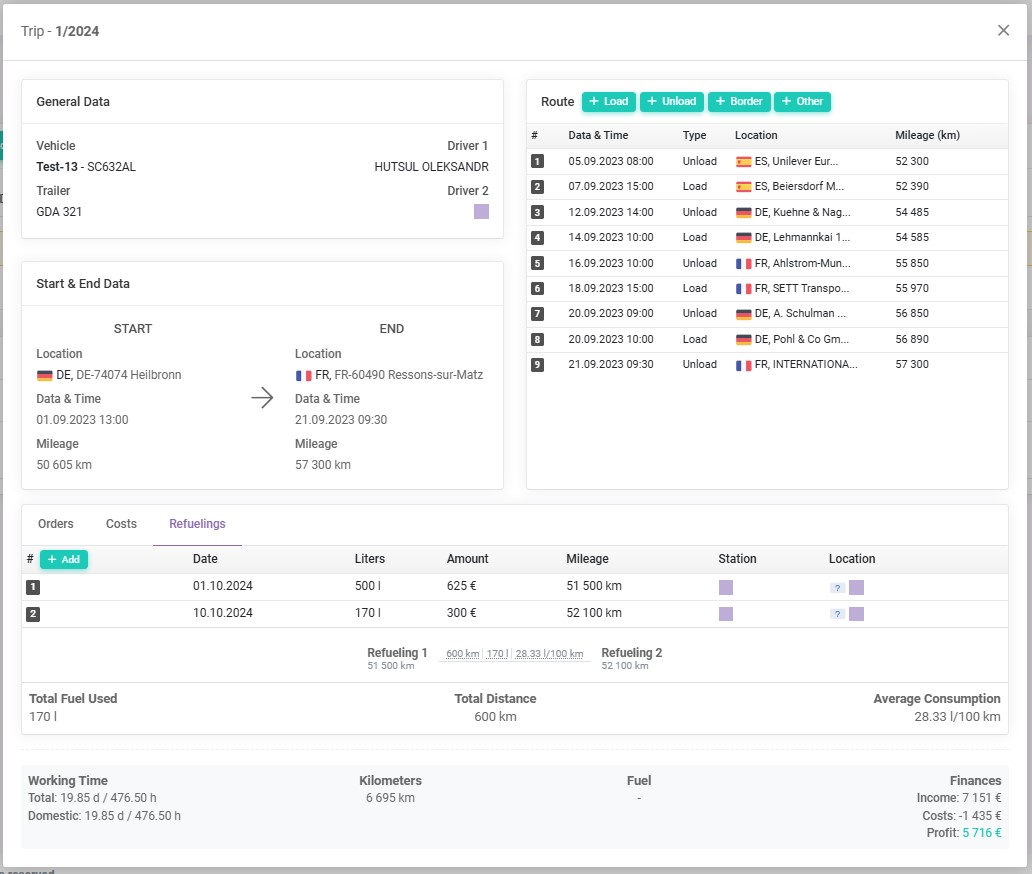
This function is designed to simplify and optimize transportation processes in your company. Below are its details and advantages.
What are Trips?
Trips are detailed documents that describe the transportation plan, including the route, departure and arrival times, as well as other important information. Within this functionality, route sheets are generated to accompany vehicles during transportation, ensuring transparency and compliance with regulations.
Why are Trips Needed?
The trip function was developed with the following goals in mind:
-
Efficiency: Automatic generation of trips based on entered transport orders significantly saves time and reduces the risk of errors.
-
Transparency: Each trip contains detailed information about the vehicle, route, and expenses, simplifying the monitoring of transportation processes.
-
Fleet Management: This function supports effective route planning, allowing for better utilization of transportation resources and optimizing costs.
We have also added the ability to enter expenses related to each trip, including refueling costs and fuel consumption calculations. With this, you can:
-
Carefully Track Expenses: The ability to add expenses to trips allows for precise tracking of all costs related to transportation, simplifying budget management. You can now also record the amount of fuel consumed during each trip.
-
Analyze Financial Efficiency: Entering expenses into the system enables the generation of reports on the profitability of trips and identifying areas where costs can be reduced. Additionally, the system automatically calculates the average fuel consumption based on data about the distance traveled and the amount of fuel refueled, allowing for a better understanding of vehicle operating efficiency.
-
Optimize Routes: By analyzing fuel consumption data, you can adjust transportation routes to minimize fuel expenditure, leading to financial savings.
How Does It Work?
After entering a transport order into the system, you can easily generate the corresponding trip. The system automatically fills in all important data, such as information about the vehicle, driver, and route. You can also add details about trip expenses, including refueling costs, allowing you to manage finances better.
Other Updates in the [Fleet] Module
- Added ability to restore vehicles from the archive independently (previously, it was necessary to contact SmartCP tech. support).
Updates in the [Customers] Module
- Added an address for correspondence
- The process of adding a customer by VAT number has been simplified: the system now automatically determines the country by the code specified in the VAT number (for example, DE12345—Germany), without the need to manually select the country from a list
- The ability to specify the currency conversion date for the invoice by default has been added. Four options are available:
- The previous day from the invoice date
- The previous day from the service provision date
- By loading date
- By unloading date
This allows the system to automatically use the selected option when converting currency when generating an invoice for a client based on the transport order
Updates in the [Finances] Module
Added ability to navigate from the invoice to the order
Added ability to ignore invoice serial number chronology when creating an invoice
Added ability to choose the product/service name from history
Added ability to consider loading/unloading addresses in the product/service description when generating an invoice based on the transport order has been added. To activate this option, it needs to be enabled in the configurations on the Invoices tab.
Added ability to attach files to the invoice
If you have any questions or require further clarification, please feel free to reach out to us at support@smartcp.org.
Best regards,
SmartCP Team