

Dear Customers,
In this update, we are introducing new options for managing orders at base and in the warehouse in SmartCP Logistics. You can now record returns to base, warehouse unloading and loading, and onward departures within the same transport order, with a clearer overview of the vehicles and drivers involved in each part of the journey.
What’s New?
A transport does not always go directly from loading to final delivery. Cargo may return to your base, wait on a loaded trailer or in the warehouse, and continue with another vehicle and driver. SmartCP Logistics now supports these steps in Orders and Dispo-Plan, helping dispatchers follow the entire transport in one place.
New Tasks for Base and Warehouse Operations
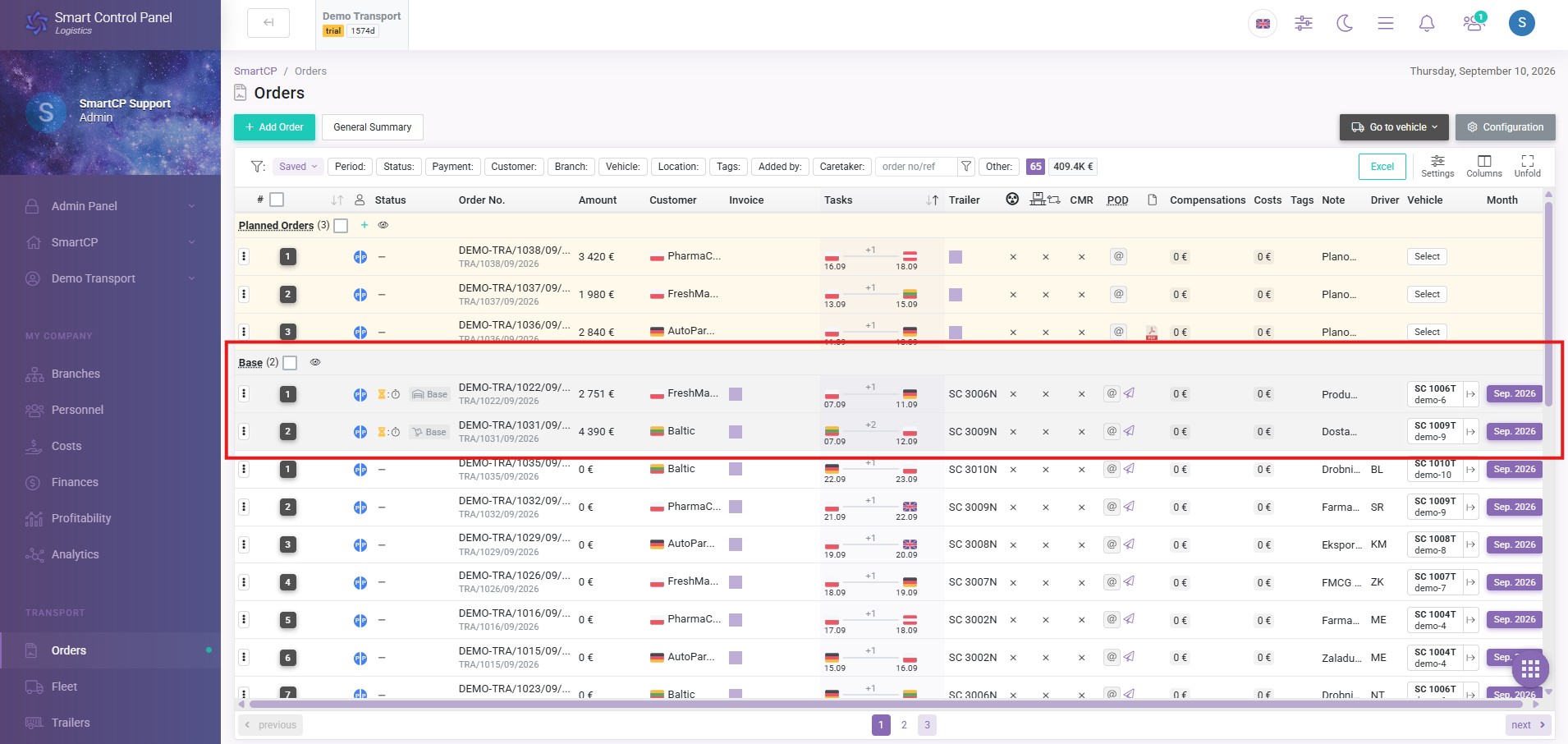
You can use the following tasks to record each stage of the transport:
- Return to base: record a return to your base before the transport continues.
- Unload to warehouse: record when cargo is unloaded into the warehouse.
- Load from warehouse: record when cargo is loaded again for onward transport.
- Departure from base: record the departure and select the vehicle continuing the journey.
- Transfer to carrier: record when an external carrier takes over the transport.
The order remains at base after Load from warehouse. It leaves the base stage only with Departure from base or Transfer to carrier, so loading and departure can be planned separately.
For example, one vehicle can collect cargo in Italy, return to base, and unload it into the warehouse. Another vehicle can later load the cargo and depart for delivery in Lithuania. The complete sequence stays within the same transport order.
A Clearer View of Orders at Base
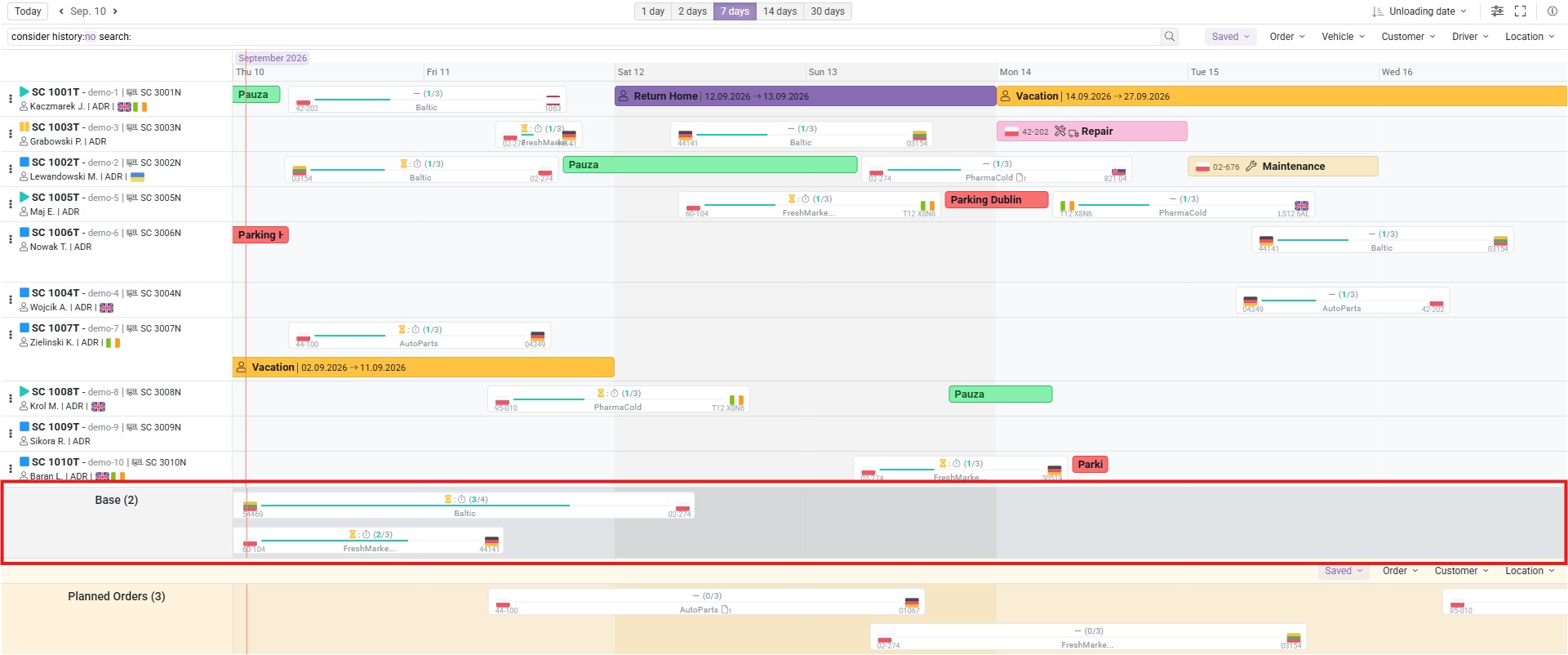
A dedicated Base row in Dispo-Plan displays orders with cargo or loaded trailers waiting at base. Dispatchers can see which transports are awaiting continuation alongside the work assigned to individual vehicles.
You can show or hide the Base row to keep the planning view comfortable when many orders are waiting. Transport order filters also apply to base orders in both Dispo-Plan and Orders, helping you focus on the work relevant to your current selection.
In the order list, a Base badge identifies these orders. Hovering over it shows the current base task’s label and icon, making it easier to distinguish a return to base from warehouse unloading or loading. Order changes are also reflected in Dispo-Plan as your team works.
Manage Several Handovers Within One Order
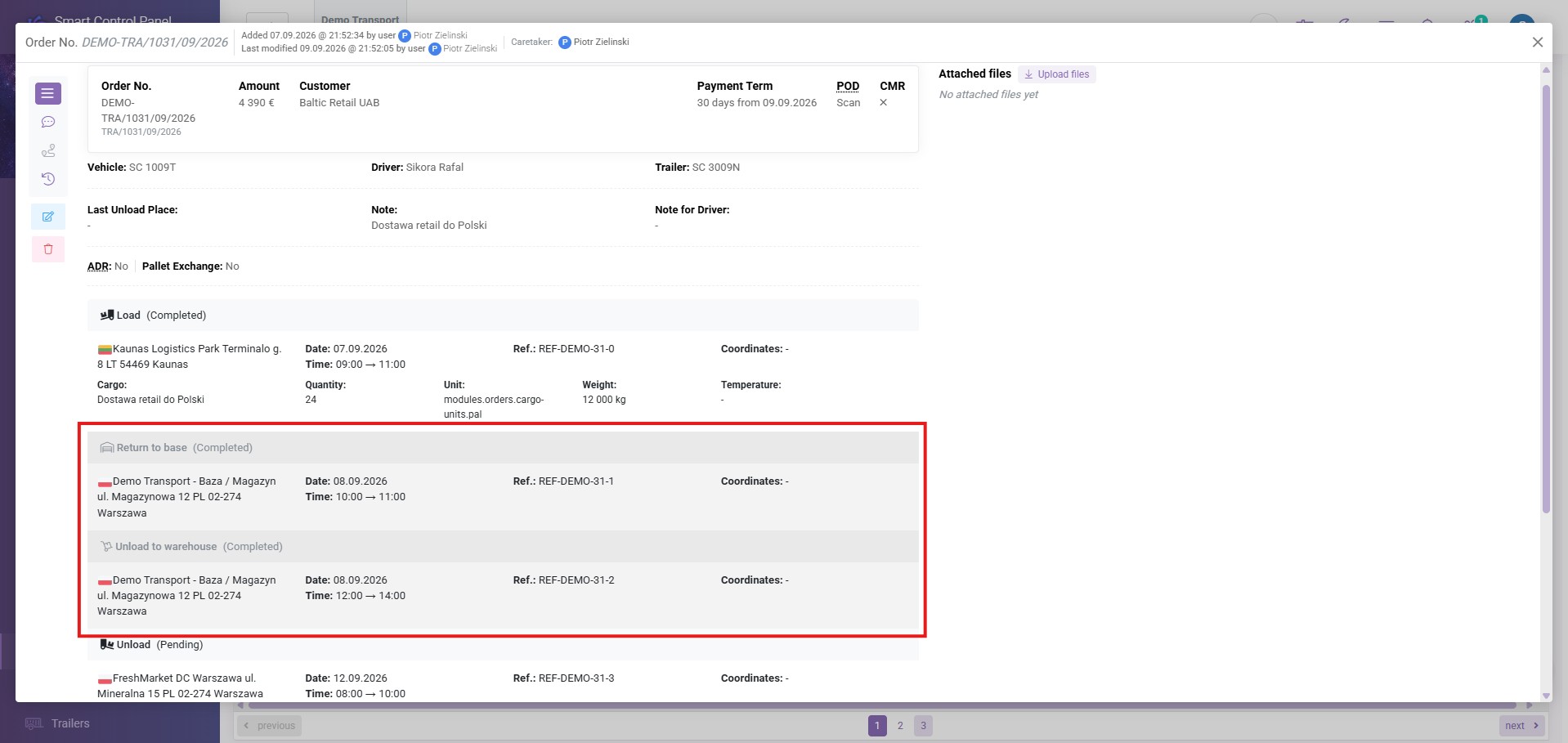
When a transport involves several vehicles, you can add consecutive Trailer Swap tasks between loading and delivery. You can also add Return to base after a Trailer Swap, without inserting an additional unloading task.
Dispo-Plan shows the corresponding parts of the order on the vehicles involved. Hovering over a related item highlights the connected parts, helping dispatchers follow the cargo across vehicle changes.
To reduce repeated entry, the vehicle selected for Load from warehouse is automatically carried over to the following Departure from base.
See Which Drivers Took Part in the Transport
Tasks that split an order, such as Trailer Swap and Departure from base, allow you to specify the drivers taking over the next part of the journey when using your own vehicles.
These assignments are visible in the order view. Your team can see both the driver who originally collected the cargo and the driver who picked it up at base and continued to delivery, keeping the participants in the transport clear.
Working Time Reports That Account for Handovers
The Report to calculate working time has also been updated to account for the driver’s part of an order. A handover can serve as the ending action for the driver handing over the cargo and the starting action for the driver taking over.
When the relevant part of a transport begins before the selected reporting period and ends within it, the report retains its beginning as well. This provides more complete information when preparing working time data for Tachospeed and 4Trans.
Why This Matters
For transport companies using their base as a transfer point, this update brings transport order management closer to everyday operations. Dispatchers can identify cargo waiting for departure, coordinate vehicle and driver changes, and follow warehouse stops without losing the connection to the original order.
Keeping these details together in your transport management system supports clearer communication between the people planning transport, handling cargo, and preparing driver reports. It also reduces repeated data entry when a journey involves several vehicles.
Summary
SmartCP Logistics now gives you a more complete view of transport orders that pass through your base or warehouse. From the first loading through storage, handovers, and onward departure, you can keep the tasks, vehicles, and drivers connected within one order and follow their progress in Dispo-Plan.
If you have any questions or need assistance, please contact our support team at support@smartcp.org.
Best regards,
SmartCP Team