
![[Fleet] "Dispo-Plan" Feature](https://i.ibb.co/wMVXMrY/dispo-en.png)
Dear Customers,
We have released a new addition to our system - the "Dispo-Plan" feature.
What is Dispo-Plan?
Dispatch Plan, also known as "Dispo-Plan" is a powerful tool that enhances your ability to manage and monitor your fleet of vehicles in real time. With this new feature, you gain a comprehensive view of all your vehicles, their current statuses, and their availability for new assignments.
Key Benefits of Dispo-Plan:
Real-Time Visibility: Stay informed about the exact location and status of each vehicle in your fleet, whether it is in work, awaiting an assignment or ready for new work, you can track it all with ease.
Efficient Resource Allocation: Optimize your fleet's performance by assigning tasks to available vehicles swiftly. Eliminate delays and ensure that each vehicle is used to its full potential.
Streamlined Operations: With Dispo-Plan, you can enhance the efficiency of your transportation operations, minimize idle time, and reduce overall costs.
How to Use Dispo-Plan:
Access: Dispo-Plan is located in "Fleet" module in relevant tab called "Dispo-Plan".
Assignment management: In the "Orders" module, add orders to each vehicle with data about loads and unloads, and the system will automatically generate a Dispo-Plan based on this data. Just do what you did before. (The structure of loads/unloads has been slightly changed, see below for details)
Vehicle status: the Dispo-Plan tab contains a list of all vehicles with brief information about their status and activity. There is a button next to the name and number of the car, if you click on it, you will be able to see detailed information.
Changes in the structure of loads/unloads (hereinafter the "task") related to the addition of the Dispo-Plan:
Dynamic Quantity: Instead of the fixed 6 tasks, you can now specify as many as you need.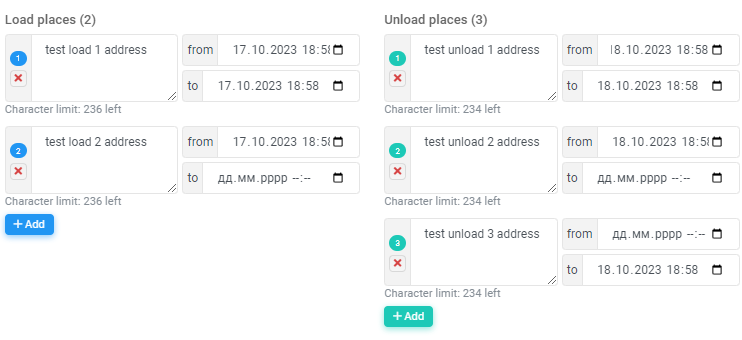
Dates: Added 'date from' and 'date to' for each task (image above), which can now also be specified when adding an order. Added task completion date and time difference between expected and actual task completion date.
Statuses: Each task now has its own execution status ('Pending', 'In Progress' and 'Completed'). Since it makes no sense to display the status on completed orders - the status will only be displayed on the last order in the month (i.e. the current order).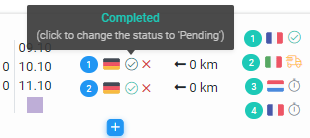
Note: For users who have set up integration with the tracking system - the order completion date and task status will be updated automatically, just as it happens with the odometer value and the fuel quantity.
If you have any questions or need help implementing the Dispo-Plan feature in your daily workflow, our support team is ready to help: support@smartcp.org.
Best regards,
SmartCP