

Dear Customers!
During the last two months we have been making small updates to the system, which were intuitive, so we did not make separate announcements.
Today, however, we are pleased to present an important update that will bring significant changes in working with the system. In this regard, we would like to share the details of this update, as well as list all the small improvements made over the last two months.
Major update: [Orders] module
New structure of tasks in orders
We have moved away from categorizing the tasks in an order.
Previously the structure looked like this: two categories of tasks in an order, first uploads then unloads.
We have changed this structure to a more standard one, where you simply add tasks with the appropriate type according to their order.
Old structure: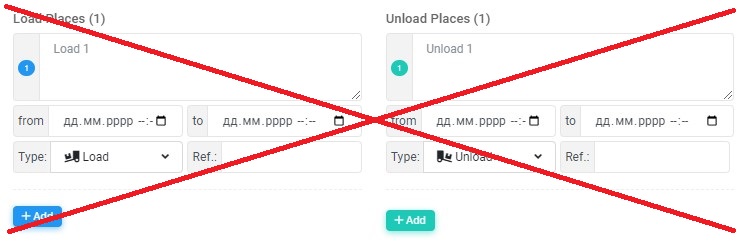 |
New structure: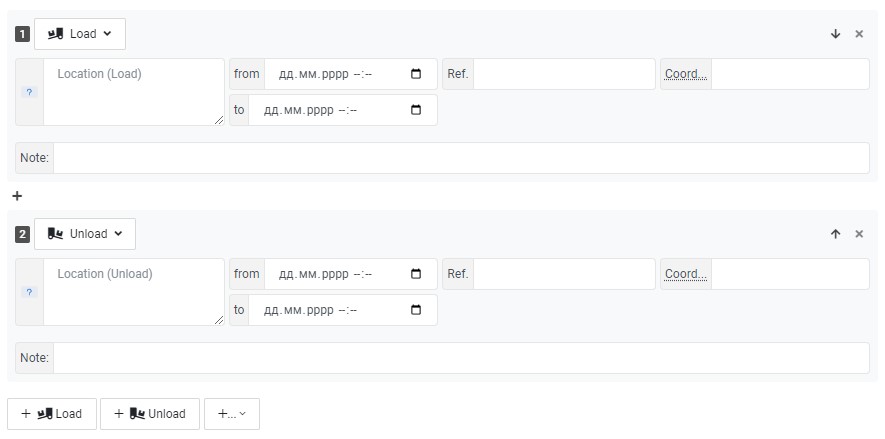 |
Updates related to tasks in the order
- Added “Temperature” parameter to the task data
- Added “Coordinates” parameter to the task data
- Added “Note” parameter to the task data
- Added possibility to change the country flag in the task when clicking on it
Other updates in the Orders module
- Added several settings to the orders list, allowing you to slightly change the appearance of the orders list.
The button with settings is located on the top right above the list of orders: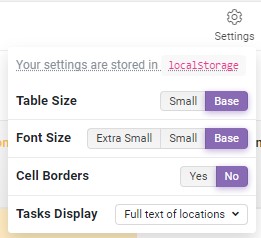
- Due to the change in the structure of tasks, we have redesigned the display of tasks in the orders list.
Now you have 4 modes for displaying tasks in the order list:
To select the mode of displaying tasks, open the settings on the top right above the list of ordersCompact - first and last task: 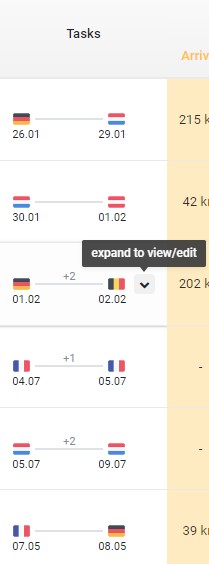
Compact - all tasks horizontally: 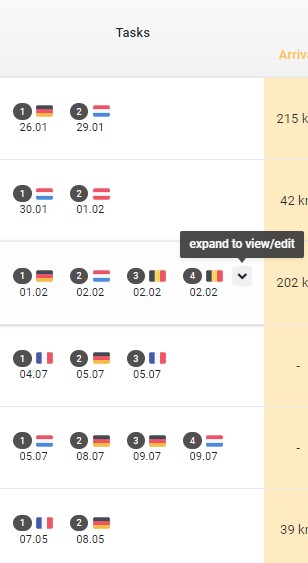
Compact - all tasks vertically: 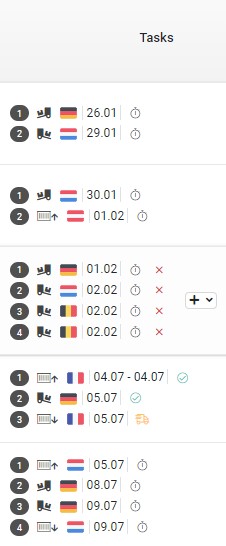
Full text of locations: 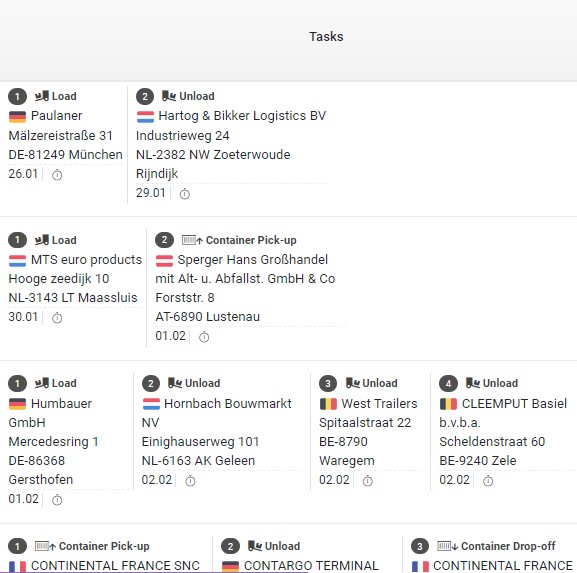
- Added the ability to generate a PDF order for a driver.
PDF for driver will contain only necessary data for driver (for example, such data as order amount or customer name will not be specified).
Added “Template” tab in the settings of the Orders module, where you can add and customize the display of your company logo in the PDF file. - A new parameter “Note for driver” has been added to the order data. This note will be visible in the driver PDF that can be generated for the driver.
- The appearance of adding/editing/viewing an order has been changed.
We have arranged the data fields in a more logical order, and to maintain a consistent format for the order appearance, including the PDF for the driver. - Dispatcher fee: added the ability to specify the dispatcher fee in % based on the order amount. To use this feature, you just need to enable it in the settings of the Orders module in the “General” tab.
- Added the ability to quickly fill in data based on previously entered data (selection from history) when adding an order to the system.
It works for the following data: Location in the task, container type and shipping company, if container transportation. - Added ability to generate own order number. The own order number will be used when generating the PDF for the driver. If the own number is not specified, the original order number will be specified.
The “Own order number” tab has been added in the settings of the Orders module, where you can enable the use of your own order number and customize its format.
Previous updates
Module [Finance] (Invoices)
- Added “Sales” and “Purchase” invoice types. Now you can also add purchase invoices to the system and upload the original invoice file to them.
- Added possibility to issue a corrective invoice based on the issued sales invoice. Also such an invoice will have its own type - Correcting invoice.
- Added filter by invoice type
- Added new parameter “Service date” to the invoice data
- Added new parameter “Note” to the invoice data
- Added “Discount” field to the data of the product item in the invoice. You can specify the discount in % of the amount or directly the amount of the discount
- To the data of the goods item in the invoice, in the field of VAT tax added the possibility to specify the note “N/A” - not applicable
- Added possibility of currency conversion at the official exchange rate
- Added possibility to change invoice number manually
Module [Dispo-Plan]
- Added tab Vehicle Locations), where you can view the location of all vehicles on one map
Module [Customers]
- Added possibility to add customers by specifying the country and VAT number of the company. The data is pulled from the VIES database (official source of the European Commission)
Integrations
Redesigned the structure of integrations and moved them to the admin panel, now only the system administrator has access to configure integrations.
Created a catalog of available integrations and made it possible to configure integration from one vendor several times (for example, for different companies that use the same vendor).
Integrations with new telematics
- Navira
- GBox - INELO
- Linqo
If you have any questions or require further clarification, please feel free to reach out to us at support@smartcp.org.
Best regards,
SmartCP Team